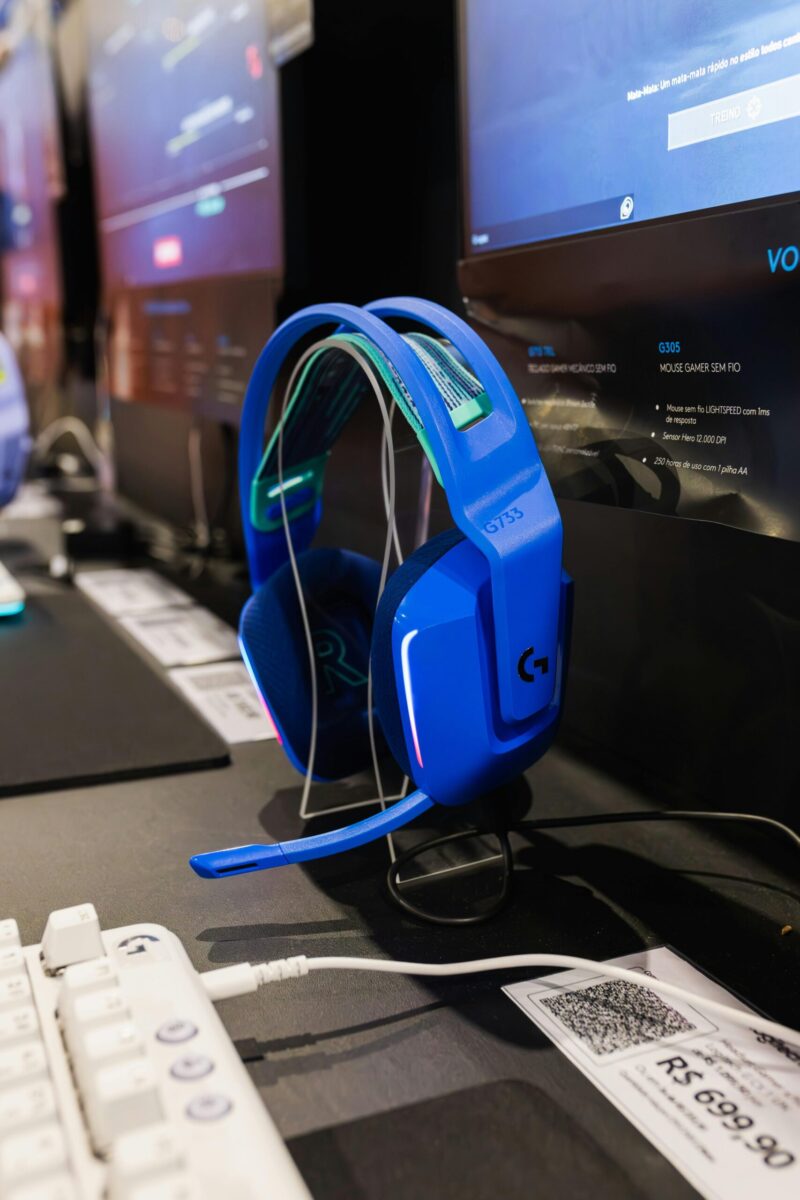
If you crave sweeping, cinematic sound that wraps around you, and you want your desk to glow while it happens, you’re in the right place. This guide zeroes in on top-rated RGB headsets for spatial audio immersion, pairing vibrant lighting with convincing 3D sound so you can track footsteps, feel engine rumbles, and hear games the way designers intended. You’ll find clear picks for every platform and budget, plus tuning tips that squeeze out every last drop of immersion.
How We Test RGB Spatial Headsets
Spatial audio lives or dies on fit, tuning, and software. So when you see a pick here, it means it cleared a pretty high bar:
- Consistent spatial imaging: We verify positional accuracy with game scenes heavy on verticality and occlusion (Apex Legends, Valorant, Helldivers 2), as well as movie clips mixed in Dolby Atmos and DTS.
- Multi-platform checks: If a headset claims PC, PlayStation, or Xbox support, we test the actual spatial standard in use (Dolby Atmos, DTS Headphone:X, Windows Sonic, or Tempest 3D) rather than relying on box copy.
- Mic and chat clarity: We record voice samples in Discord and PS Party Chat, judge sidetone latency, and check noise suppression against mechanical keyboard chatter and a fan.
- Comfort marathons: At least three multi-hour sessions to see if clamp force, pad heat, and hotspot pressure creep in. Weight matters, but pad material and yoke design matter more.
- Software and RGB: We evaluate EQ granularity, per-app profiles, and how lighting affects battery life and system performance. We also flag any driver conflicts.
In short, if it made this list, it didn’t just look good on a product page, it performed in real play.
Best RGB Headsets Overall
Best Overall
JBL Quantum 910 Wireless
For pure spatial immersion with RGB flair, the Quantum 910 Wireless is the one to beat. JBL’s head-tracking option anchors the soundstage in front of you, so when you turn your head, it feels like you’re in a real space, not just inside two speakers strapped to your skull. The effect adds a surprising sense of elevation and distance in games like Cyberpunk 2077 and Battlefield.
On PC, you get DTS Headphone:X via JBL QuantumENGINE, and you can fine-tune the HRTF to match your ear shape. The mic is crisp, the clamp is moderate, and the ear cushions breathe better than most leatherette rivals. Battery life with RGB on lands in the “all-day then some” range, and the 2.4GHz dongle is rock solid.
Why it wins: convincing head tracking, balanced tuning out of the box, reliable software, and tasteful, diffused RGB that doesn’t scream.
Best Wireless
Corsair HS80 RGB Wireless
The HS80 RGB Wireless nails the fundamentals: sturdy build, comfortable floating headband, and a broadcast-leaning microphone that makes you sound like a human, not a walkie-talkie. On PC, you can enable Dolby Atmos for Headphones (via the Dolby Access app), and the imaging is superb, forward cues are tight, rear cues sound distinct rather than smeared. On PS5, it plays nicely with Tempest 3D over the USB dongle.
You also get Corsair iCUE for EQ and lighting sync with your keyboard and fans. The RGB is subtle, just enough glow on the logos to tie your setup together. If you want top-tier wireless performance with dependable spatial audio on multiple platforms, this is the safe, smart pick.
Best Wired
Razer Kraken V3 HyperSense (USB)
If you want wired reliability and maximum “wow,” the Kraken V3 HyperSense is a blast. THX Spatial Audio provides accurate surround virtualization, but the kicker is the HyperSense haptic feedback that responds to low-frequency content. Explosions and engine revs get a tactile layer that genuinely deepens immersion without turning your head into a massage chair.
The cardioid mic is clean enough for streams in a pinch, the cooling-gel pads stave off heat, and Razer Synapse gives you granular control over EQ, THX profiles, and Chroma RGB. It’s not a featherweight, but the payoff in cinematic feel is worth it if you prefer wired simplicity.
Best By Platform And Use Case
PC And Mac
SteelSeries Arctis Nova 3 (USB-C)
For plug-and-play spatial on desktop and laptops, Nova 3 hits a sweet spot. The USB-C connection is tidy, the RGB rings are refined, and the drivers deliver a clean, slightly warm sound that avoids harshness at higher volumes. On Windows, you can enable SteelSeries Sonar for parametric EQ and spatial processing: on macOS, you get reliable class-compliant audio with your choice of app-based spatial solutions in games that support it. It’s light, flexible, and the fabric pads stay comfortable over long sessions.
PlayStation And Tempest 3D
Corsair HS80 RGB Wireless
Paired with PS5, the HS80 handles Tempest 3D with zero fuss. You get consistent front/back separation in titles like Returnal and Horizon Forbidden West, plus a mic that teammates won’t complain about. The on-headset controls are intuitive, battery life is solid with lighting set to a low effect, and the build feels premium for the price. If you value seamless console behavior and understated RGB, this one just works.
Xbox And Dolby Atmos
JBL Quantum 910X Wireless or Razer Kaira Pro for Xbox
Xbox leans on Dolby Atmos for Headphones, and both of these deliver. The Quantum 910X brings the same excellent head tracking and RGB presentation found on the PC-first 910, while the Kaira Pro uses Xbox Wireless for lag-free connectivity and adds Chroma RGB accents that pop on a dark shelf. With Atmos enabled, you’ll hear vertical cues in Halo Infinite and Gears 5 with convincing height and distance. If you prefer a lighter fit and flashier lighting, pick Razer. If you want head tracking and a more neutral sound, go JBL.
Budget And Value Picks
Under $100 Standout
Razer Kraken V3 (USB)
The non-HyperSense Kraken V3 keeps the Chroma RGB, THX Spatial Audio, and comfy cooling-gel pads, but drops the haptics to hit a friendlier price. You still get a wide, theater-like stage and a mic that’s perfectly fine for nightly squad runs. If you want affordable, reliable RGB plus legit spatial processing, this is the under-$100 darling.
Midrange Sweet Spot
Logitech G733 LIGHTSPEED
The G733 is the “forget it’s on your head” option. It’s very light, the fabric strap breathes, and the dual-zone RGB across the front edge is eye-catching without being gaudy. DTS Headphone:X 2.0 gives you accurate positional audio on PC, and battery life with RGB at low brightness stretches well past a long raid night. The mic’s Blue VO.CE filters help you cut room noise and add clarity fast. For the price, it’s an easy recommendation if comfort tops your list.
Buying Guide: Features That Matter
Spatial Standards And App Support
The best spatial experience isn’t just “on” or “off”, it’s about the right virtualizer for your platform and the app to drive it. On PC, Dolby Atmos, DTS Headphone:X, THX Spatial, and SteelSeries Sonar all do convincing work, but they have different tunings. Atmos tends to feel cinematic with strong height, DTS offers precise competitive imaging, and THX gives a balanced, game-first presentation with per-title profiles. On PlayStation, Tempest 3D is baked into the console: your job is choosing a comfortable headset that passes it cleanly. On Xbox, Dolby Atmos for Headphones is the play, make sure your headset connects via Xbox Wireless or a compatible dongle and that you’ve activated the Atmos app license.
A quick rule of thumb: match your competitive priorities. If you grind ranked shooters, look for DTS or a vendor app with a competitive preset. If you love single-player epics and film, Atmos or THX will feel more “theatrical.”
Sound And Mic Quality
Spatial magic falls apart if the base tuning is bad. You want tight bass that doesn’t swamp the mids, a clean midrange for footsteps and dialogue, and treble that’s energetic but not sizzly. Headsets like the HS80 and G733 get this balance right: the Quantum 910 adds head tracking without turning the sound into a science experiment. On mics, don’t obsess over broadcast perfection, prioritize intelligibility and stable noise reduction. Firm sidetone (monitoring your own voice) helps prevent shouting during late-night sessions.
Comfort, Weight, And Build
Comfort is your hidden performance stat. Floating headbands (Corsair, Logitech) spread weight well: fabric or hybrid pads breathe better than plain leatherette. Check clamp force, too loose and imaging shifts when you turn: too tight and you’ll get jaw fatigue. For build, steel-reinforced headbands and swivel hinges survive the “toss on the desk” lifestyle. RGB diffusion also matters: frosted rings look more premium and cast softer light than exposed LEDs.
Setup And Tuning For Maximum Immersion
EQ, HRTF, And Game Profiles
Start with the maker’s spatial preset, then nudge. Drop sub-bass a hair if explosions mask footsteps, add a gentle 2–4 kHz lift for footfall clarity, and tame any 8–10 kHz sizzle if gunfire gets fatiguing. If your app includes HRTF size/shape options (JBL QuantumENGINE, some DTS builds), try each and stick with the one that gives you the most stable rear imaging when you slowly rotate your character in a quiet scene.
Game profiles are worth it: competitive titles benefit from tighter bass and boosted presence: open-world RPGs shine with a mild V-shape and a bit more height virtualization. Don’t be afraid to keep two profiles and swap per title.
Mic tip: enable sidetone around a low-to-medium level so you don’t over-project and fatigue your voice.
Lighting Sync Without Performance Hits
RGB is part of the fun, but it shouldn’t cost you frames or battery. Three quick rules:
- Keep headset lighting at medium brightness with a static or slow-reactive effect: it looks cleaner on camera and saves hours of battery.
- If your ecosystem supports it (iCUE, Chroma Studio, Logitech G HUB), sync just your “perimeter” gear, case fans, keyboard edge, and headset, and leave your GPU and motherboard on lighter effects to reduce software overhead.
- On laptops, disable device discovery polling you don’t need in RGB software, and lock your headset profile so the app doesn’t keep reapplying effects mid-game.
Frequently Asked Questions
What is the best RGB headset for spatial audio immersion?
The JBL Quantum 910 Wireless tops our list for RGB headsets for spatial audio. It pairs DTS Headphone:X with head tracking that anchors the soundstage as you move, plus customizable HRTF in JBL’s software. You get crisp mic quality, long battery life even with RGB, and stable 2.4GHz wireless.
Which RGB headset works best with PS5 Tempest 3D Audio?
The Corsair HS80 RGB Wireless is our PlayStation pick. It passes Tempest 3D cleanly via the USB dongle, delivering reliable front/back separation in titles like Returnal. It also offers comfortable suspension-band design, intuitive on-ear controls, subtle RGB, and strong mic clarity for party chat.
How does head tracking improve spatial audio on RGB headsets?
Head tracking stabilizes the virtual soundstage in front of you, so audio stays “anchored” to the world as you turn. That enhances elevation and distance cues, reducing front/back confusion. The JBL Quantum 910 series uses this to make footsteps, engines, and environmental effects feel more lifelike.
How should I tune EQ and HRTF for better spatial accuracy?
Start with the headset’s spatial preset. Trim sub-bass slightly if rumbles mask footsteps, add a gentle 2–4 kHz lift for clarity, and tame 8–10 kHz if gunfire gets harsh. If your app offers HRTF options, test each and choose the one that gives the most stable rear imaging.
Do I need Dolby Atmos or DTS licenses for RGB headsets on PC and Xbox?
On PC, Dolby Atmos for Headphones requires the Dolby Access app (often a paid license after trial). DTS Headphone:X typically unlocks via the headset’s software. On Xbox, enable Dolby Atmos for Headphones through Dolby Access; some headsets include a code. Activate the license, then select the spatial format in audio settings.
USB vs 2.4GHz vs Bluetooth: which connection is best for spatial audio gaming?
For RGB headsets for spatial audio, USB and 2.4GHz are best. USB (wired) offers zero pairing fuss and minimal latency; 2.4GHz provides console-friendly, low-latency wireless. Bluetooth adds convenience but higher latency and inconsistent spatial support, so it’s not ideal for competitive play or precise positional cues.
No responses yet