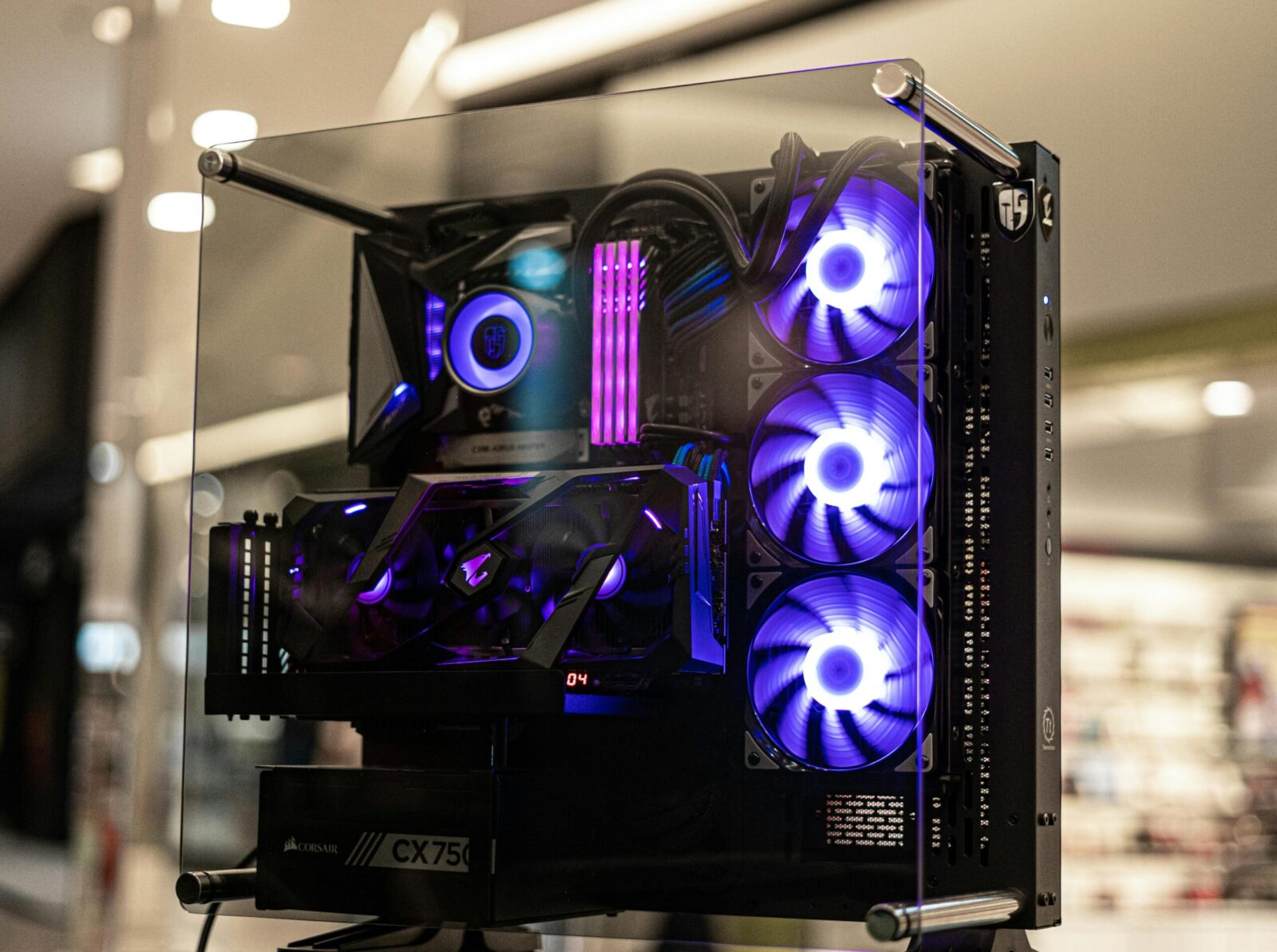
If you’re chasing that glass-panel glow and you want lighting that looks as premium as your frame times, the right ARGB liquid cooling kit matters. Not all RGB is equal, some coolers blast hotspots, others melt into a smooth neon wash, and a few sync perfectly with your entire setup. This guide cuts through the marketing and spotlights the liquid cooling kits with the best addressable RGB (ARGB) effects right now, along with how we tested them and how to get pro‑level results in your own build.
What Makes Great ARGB In A Liquid Cooler
LED Density And Diffusion
ARGB magic starts with the basics: more diodes and better diffusers. High LED density means smoother gradients with fewer visible “steps,” especially in rainbow wave and pastel themes. Quality diffusion, frosted pump caps, light pipes, ring diffusers around fans, blends those points into a continuous glow without harsh hotspots. When you see a uniform halo at a glance (and no “dotty” pixels on close inspection), that’s the gold standard.
Lighting Zones And Addressability
Individual addressable zones unlock complex effects like chasing patterns, ripple waves, and per‑fan directional sweeps. On a premium AIO, expect per‑LED control on the pump cap and multiple zones per fan (hub ring, outer ring). The more granular the zoning, the better your transitions look when synced across case fans, RAM, and strips.
Controller And Software Ecosystem
The best ARGB hardware can’t shine without stable control. Look for 5V ARGB (3‑pin) compatibility plus a bundled controller that consolidates fan power, PWM, and lighting. Software matters: strong suites let you layer effects, map them to temps ormusic, and sync across brands or at least within a single ecosystem without stutter or desync. Bonus points for onboard profiles that persist after boot.
Build Quality And Noise Considerations
Great lighting shouldn’t come with coil whine or rattly fans. Premium AIOs pair fluid-dynamic bearing fans with tuned PWM curves so you can keep the glow without the whoosh. Metal pump housings and tight tolerances reduce resonance, which keeps your rig looking, and sounding, clean.
How We Chose The Winners
Testing Methodology For Lighting And Thermals
We photographed each cooler in a controlled light box at fixed shutter/ISO to evaluate LED uniformity, diffusion, and color accuracy (warm whites and deep blues expose weak diffusers fast). We also captured slow‑mo clips to check effect smoothness and flicker. For performance, we ran a 30‑minute CPU load (13700K and 7800X3D) with noise‑normalized curves at 35 dBA and logged deltas over ambient.
Compatibility And Ease Of Setup
We favored kits that minimize cable spaghetti: daisy‑chainable fans, combined PWM/ARGB harnesses, and clear labeling for 5V ARGB vs 12V RGB. Extra credit for robust mounting on LGA1700 and AM5, pre‑applied paste that isn’t chalky, and radiators that play nicely with common mid‑tower cases.
Value And Warranty
ARGB is a visual upgrade, but longevity matters. We weighed five‑year warranties, pump reliability records, replacement parts availability, and total platform cost (controller included vs add‑on). Value isn’t just MSRP, it’s how refined your lighting looks day one and year three.
The Best ARGB Liquid Cooling Kits
Corsair iCUE H150i Elite Capellix XT
Corsair’s Capellix LEDs are tiny, efficient, and bright, which gives the H150i an edge in uniformity and punch without cranking exposure. The pump cap is clean with sharp diffusion, and the included AF RGB Elite fans deliver even rings with minimal hotspots. iCUE remains one of the deepest ecosystems: you can tie effects to CPU temps, game events, or stack layered profiles. Thermals are top‑tier on a 360mm rad, and the noise profile is well‑tuned, no odd tonal peaks at mid‑RPM. Setup is straightforward through the iCUE controller, though you’ll want to budget a few minutes for channel mapping if you’re syncing a full Corsair case.
Why it’s here: best‑in‑class ecosystem control and bright, consistent ARGB that scales beautifully in multi‑fan setups.
NZXT Kraken Elite 360 RGB
The Kraken Elite line is famous for its LCD pump display, but the RGB variant pairs that screen with vivid, well‑diffused fans. If you love animated GIFs or telemetry on the pump while the fans handle ambient glow, this is your pick. NZXT CAM is simple to use and, in our testing, delivered smooth effect transitions without desync. Thermally, it sits in the top pack with a balanced noise curve: the pump is quiet at idle and unobtrusive under sustained load. Cable routing is cleaner than older NZXT gens thanks to consolidated connections through the pump.
Why it’s here: a unique visual centerpiece (LCD) plus tasteful ARGB fans and dead‑simple software for fast, polished results.
Lian Li Galahad II Trinity 360
Lian Li leans into modular style: the Trinity ships with interchangeable pump caps (including an infinity‑mirror look) and excellent diffusers. Pair it with Lian Li’s ecosystem and you get stellar sync across UNI fans and strips. Lighting is smooth, saturation is strong, and whites don’t skew blue, a common budget pitfall. Performance is competitive: noise levels land comfortably in the “can’t hear it over case fans” zone. Installation is painless with a solid backplate and clear AM5/LGA1700 hardware.
Why it’s here: versatile aesthetics with premium diffusion and easy ecosystem sync, especially if you already run UNI fans.
Cooler Master MasterLiquid PL360 Flux
The PL360 Flux focuses on precision: high LED density per fan, crisp diffusion, and a controller that plays nicely with motherboard software if you don’t want to live in a single brand’s app. The pump housing has a refined glow, no banding or bright seams, and fan halos look particularly good in motion effects like ripple and comet. Thermal performance is strong with a gentle acoustic profile, and the tubing routing is flexible for tighter cases. Setup is refreshingly simple thanks to clearly labeled harnesses and included splitters.
Why it’s here: excellent per‑LED smoothness and cross‑platform flexibility without locking you into one software suite.
Phanteks Glacier One D30 360
If you’re chasing ultra‑clean builds, the D30 fans are standouts. They daisy‑chain both power and ARGB, so you run a single cable per cluster, less clutter, more glow. The fan frames have edge‑lit accents and superb diffusion that looks seamless through tempered glass. Phanteks’ software is lightweight, or you can hand control to your motherboard’s 5V ARGB header. In our tests, color accuracy was top‑tier and motion effects stayed smooth even across nine chained fans. Cooling is solid, and the sound signature is pleasantly low‑frequency.
Why it’s here: the cleanest cable management with premium lighting diffusion, perfect for showpiece rigs.
ARGB Setup Tips For Stunning Results
Syncing Effects Across Motherboard And Peripherals
Pick one brain for your lighting. If you’re in a single brand’s ecosystem (Corsair, Lian Li, NZXT, Cooler Master, Phanteks), use its controller as the master and let the motherboard pass through where possible. Mixing apps often causes profile conflicts and timing drift. When you must mix, set the motherboard to a static base color and let the cooler’s controller handle the animations.
Cable Management And Daisy-Chaining
Daisy‑chain where supported (Phanteks D30, Lian Li UNI) to reduce cables per fan bank. Route ARGB and PWM on opposite edges of the radiator to avoid crossovers in the glass view. Use short extension leads behind the motherboard tray and anchor with soft ties: overtightening can transmit vibration. Leave a service loop near the pump so you can remove the radiator without tearing down the whole loom.
Recommended Presets For Different Aesthetics
- Minimalist: static 4000–5000K white on the pump, 20–30% brightness: fans on a soft breathing effect at low speed for subtle motion.
- Neon showcase: slow rainbow wave with long cycle time (20–30s) and 60–70% brightness to preserve saturation without blowing out diffusion.
- Performance signal: map pump ring to CPU temp (blue→purple→red), keep fans on a gentle comet effect tied to GPU temp for quick visual reads.
Compatibility And Installation Notes
Case Clearance And Radiator Fitment
All five picks are 360mm AIOs. Check top clearance, most mid‑towers accept 360mm, but RAM height and VRM heatsinks can pinch fan space. Front‑mounting solves that but may warm intake air. Watch radiator thickness plus fan depth: some cases need offset brackets to prevent motherboard collisions.
Intel And AMD Socket Support
You’re covered on modern platforms: LGA1700 and AM5 support is standard in current batches. If you’re buying older stock, verify the box includes the LGA1700 standoffs or request a bracket kit from the manufacturer. Mounting pressure and paste spread matter more than you think, follow the torque order in the manual to avoid pump tilt.
Power Budget And Header Requirements
ARGB is 5V 3‑pin: never plug it into 12V RGB headers. Most kits power lighting and pump via SATA plus a USB header for control. Budget two motherboard headers free: one CPU_FAN (or AIO_PUMP) and one USB 2.0. High LED counts can draw real current, use the included hub instead of stacking splitters off a single 5V header.
Frequently Asked Questions
What makes ARGB look smooth and premium in a liquid cooling kit?
The best ARGB liquid cooling kits combine high LED density with quality diffusion (frosted caps, ring diffusers, light pipes) and granular lighting zones. This delivers uniform halos, accurate colors, and smooth transitions without hotspots. Solid controllers and software keep effects in sync and stutter‑free across fans, pump caps, and strips.
Which liquid cooling kits have the best ARGB effects right now?
Top picks include Corsair iCUE H150i Elite Capellix XT, NZXT Kraken Elite 360 RGB, Lian Li Galahad II Trinity 360, Cooler Master MasterLiquid PL360 Flux, and Phanteks Glacier One D30 360. They excel in diffusion, per‑LED control, strong software, tidy cabling, and quiet performance—ideal for the best ARGB liquid cooling setups.
How do I sync ARGB lighting across my motherboard and peripherals without desync?
Pick one ecosystem as the master (Corsair, Lian Li, NZXT, Cooler Master, or Phanteks). Use its controller for animations and let the motherboard pass through or stay static. Avoid running multiple apps at once. When mixing is unavoidable, set the board to a static base color and animate via the cooler’s controller.
What should I check before installing a 360mm ARGB AIO in my case?
Confirm top or front radiator clearance, including RAM and VRM height. Verify LGA1700/AM5 bracket support. Plan for a 5V 3‑pin ARGB connection (never 12V RGB), SATA power, one USB 2.0 header, and CPU_FAN/AIO_PUMP. Consider daisy‑chainable fans to reduce cables and leave a service loop near the pump.
Does ARGB lighting affect CPU temperatures or system performance?
ARGB LEDs add negligible heat and won’t meaningfully change CPU temps. Software overhead is minimal on modern systems. Performance issues usually stem from poor airflow or aggressive fan curves, not lighting. Ensure fans aren’t obstructed, use noise‑normalized profiles, and power high LED counts from the included hub to avoid header overload.
240mm vs 360mm AIO for ARGB aesthetics—which looks better?
A 360mm AIO typically looks smoother because three fans create longer, more continuous effects and more LEDs. However, a 240mm can still look premium if LED density and diffusion are strong. Prioritize quality diffusers, per‑LED control, and tidy cable management over size alone for the best ARGB liquid cooling visuals.
No responses yet